Worked example
A sample report
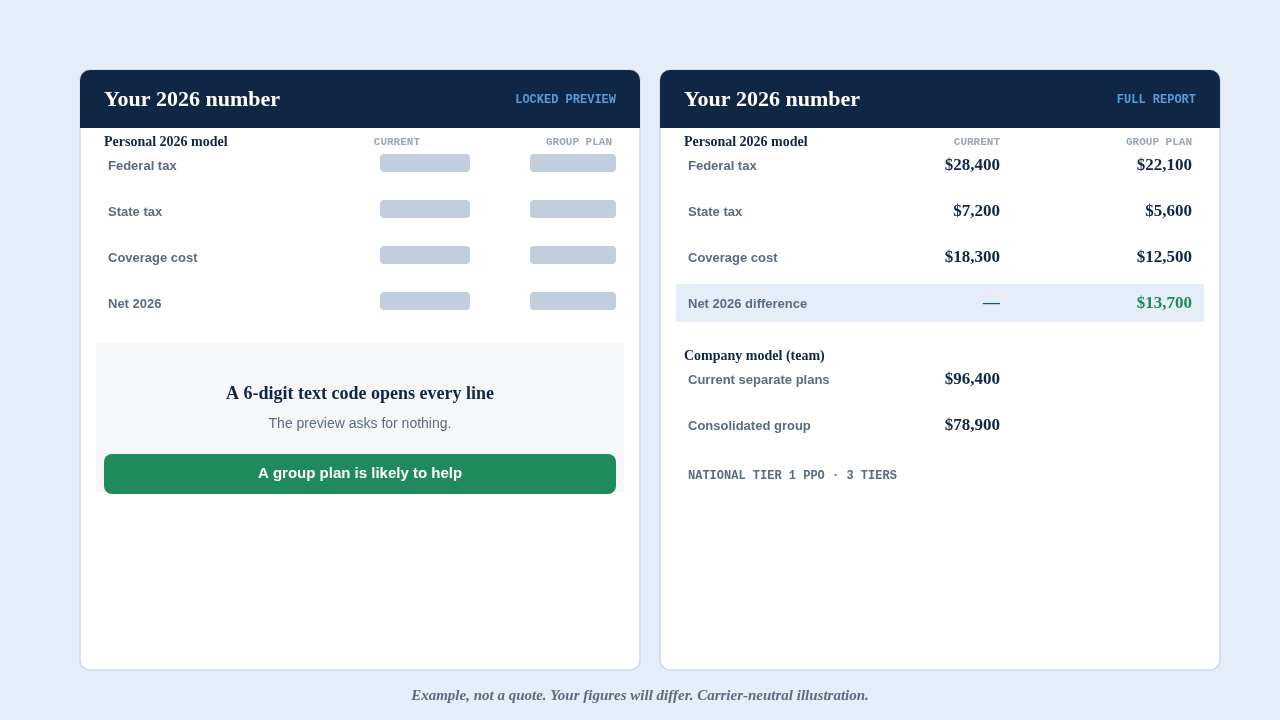
Before you run your own number, here is the actual report, annotated. This is a worked example for one owner. Your report runs your own 2026 figures, so your numbers will look different. Nothing here is a quote.
01
What you see before you share anything
The first result is the locked preview. It already shows real figures, computed from the inputs, and it asks for nothing. In the example below, the preview gives:
- The high-level answer: whether a group plan is likely to help, change little, or cost more.
- The personal summary: the owner's 2026 tax on the current path next to the tax through a group structure.
- The company summary: the team's cost today next to the cost inside the structure, when there is a team.
- The three group plan tiers on a National Tier 1 PPO.
If that preview is weak, you stop there and you have your answer at no cost. If it is strong, a 6-digit text code opens the rest.
02
Your personal model, run two ways
The report shows your 2026 federal and state tax computed on your current path, then again as it would run through a group structure, on the same income and family. It puts the two side by side and marks the difference between them. In the annotated example, that is the highlighted line.
This is a worked example, not a projection of your result. What your own figures produce depends on your income, entity, state, and situation, which is why the report carries every input behind the number for your CPA to check.
03
Your company model
When you have a team, the report adds the company view: the cost on your current separate plans for the year, the cost inside one consolidated group, and the net difference for the business. The example shows the full build behind each total.
04
The three plan tiers
The report runs your figures against the three group plan tiers, a National Tier 1 PPO, so you compare on the plan you would actually choose. You can switch tiers and watch the personal and company figures move with each one. The current prices are on the pricing page, and the underwriter and plan documents are on the coverage page.
05
The assumptions, in the open
Every figure in the report carries the inputs and rules behind it: the entity, the owner pay, the business net income, the state, and the 2026 tax treatment applied. Nothing sits inside a black box. That is what lets you copy the report link and hand it to your CPA, who keeps the final word on your tax, entity, salary, and filing. See how we calculate the number.
06
What the code opens, and what it asks
The locked preview asks for nothing. To open the full line-by-line report, you enter a 6-digit code we text you, so the only thing the access step asks for is a name and a phone number. The value is in front of you before you share anything.
We are not the plan provider. A separate, licensed provider runs the plan. We run the math and connect you. The report can come back weak and tell you to stay put, and PEO Broker is paid by the PEO, not by you, only if you enroll, so it has no reason to do otherwise.
07
Common questions
Is this my report or an example?
An example, for one owner. Your report runs your own 2026 figures, so your numbers will differ. Nothing here is a quote.
Do I have to share my information to see a report?
No. The locked preview shows real figures from the inputs and asks for nothing. Only the full line-by-line report needs a name and phone number, to text you a 6-digit code.
Will my numbers look like the example?
Not exactly. Your result depends on your income, entity, state, and situation. The report carries every assumption behind your figures so your CPA can check them.
What does the full report add over the preview?
Every line behind the summary: your personal model run two ways, your company model when you have a team, the three tiers with toggles, and the assumptions behind each figure.
Last reviewed: June 2026.
See your number
The sample is one owner's example. Yours is the one that decides it. Run your 2026 figures and see your own version of this report, built for your CPA to check.
Last reviewed: June 2026.